Public discovery
BestKavaBar
Help guests find the right location and understand what to expect before they visit.

Loading BestKavaBar
Getting the next page ready.
The page is on its way. Navigation stays available while current details and results load.
HappyKava for kava bar owners
Claim your listing, update hours and menus, publish deals and events, stay on top of guest activity, and see what is working—from one HappyKava dashboard.
Already verified? Go straight to your workspace.
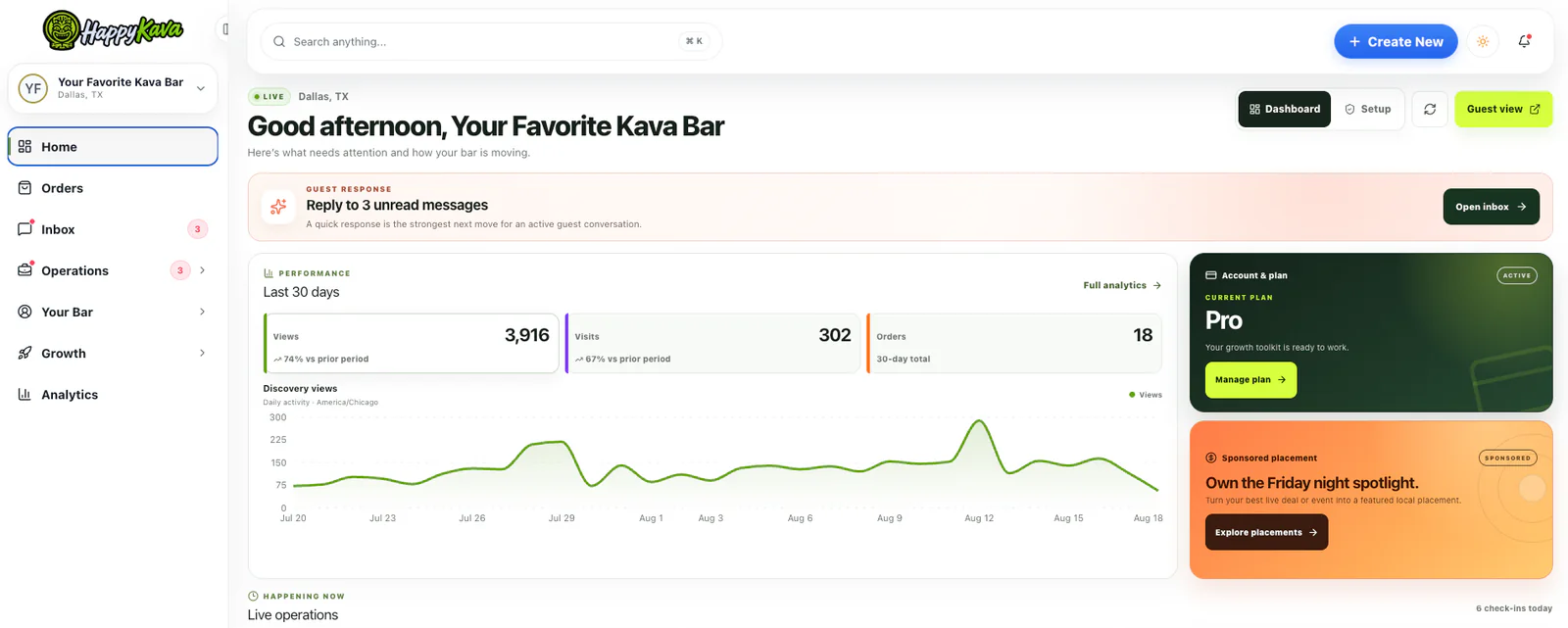
One verified profile · two connected surfaces
BestKavaBar is where people discover and compare local kava bars. HappyKava is the owner workspace for maintaining the information and activity behind that public presence. Starting with the existing profile keeps the customer journey clear.
Public discovery
Help guests find the right location and understand what to expect before they visit.
Owner control
Maintain current details, publish timely reasons to visit and monitor the work.
The current owner portal
HappyKava brings the recurring work of running a public-facing bar profile into focused tools. Here is what those tools look like now.
Tools shown are current product screens. Availability can vary by plan, role, market and staged rollout; your dashboard shows what applies to your account.
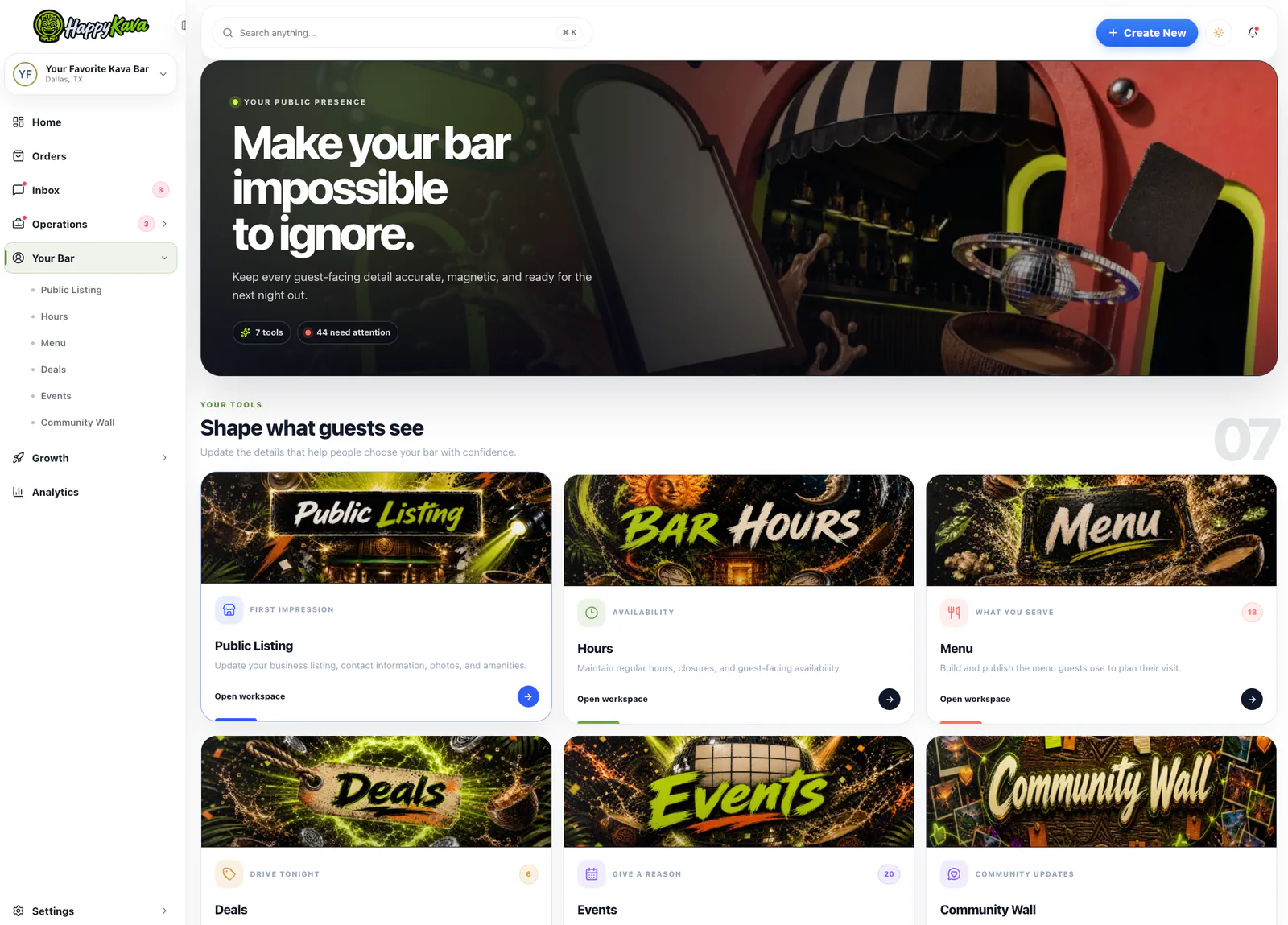
Keep the practical details people use to choose a bar—identity, hours, menu, deals and events—inside one owner workspace. The structure makes it easier to spot the section that needs attention without rebuilding a listing from scratch.
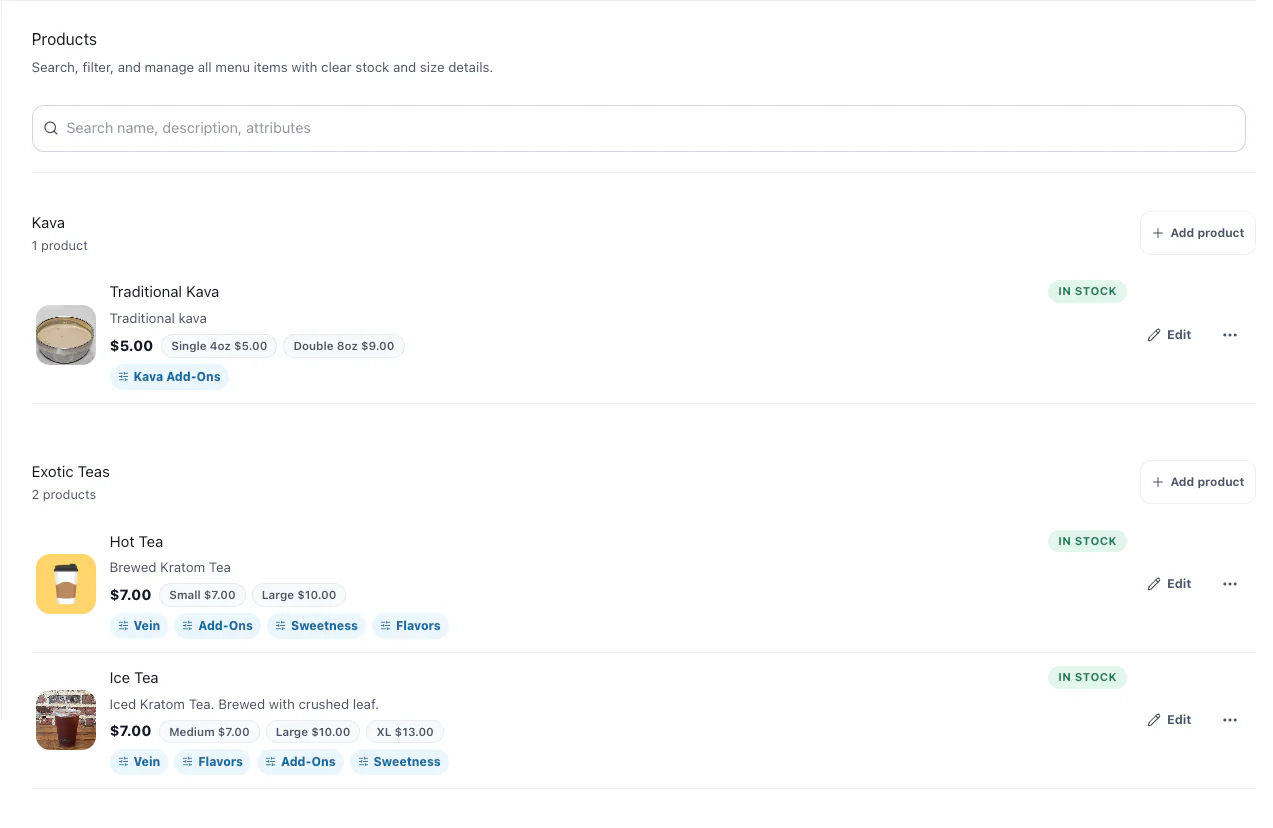
Organize products by category, add sizes and prices, connect add-ons and show stock status from a focused product workspace. It is built for the way kava bar menus actually branch into preparations, flavors and serving sizes.
Compare current owner plans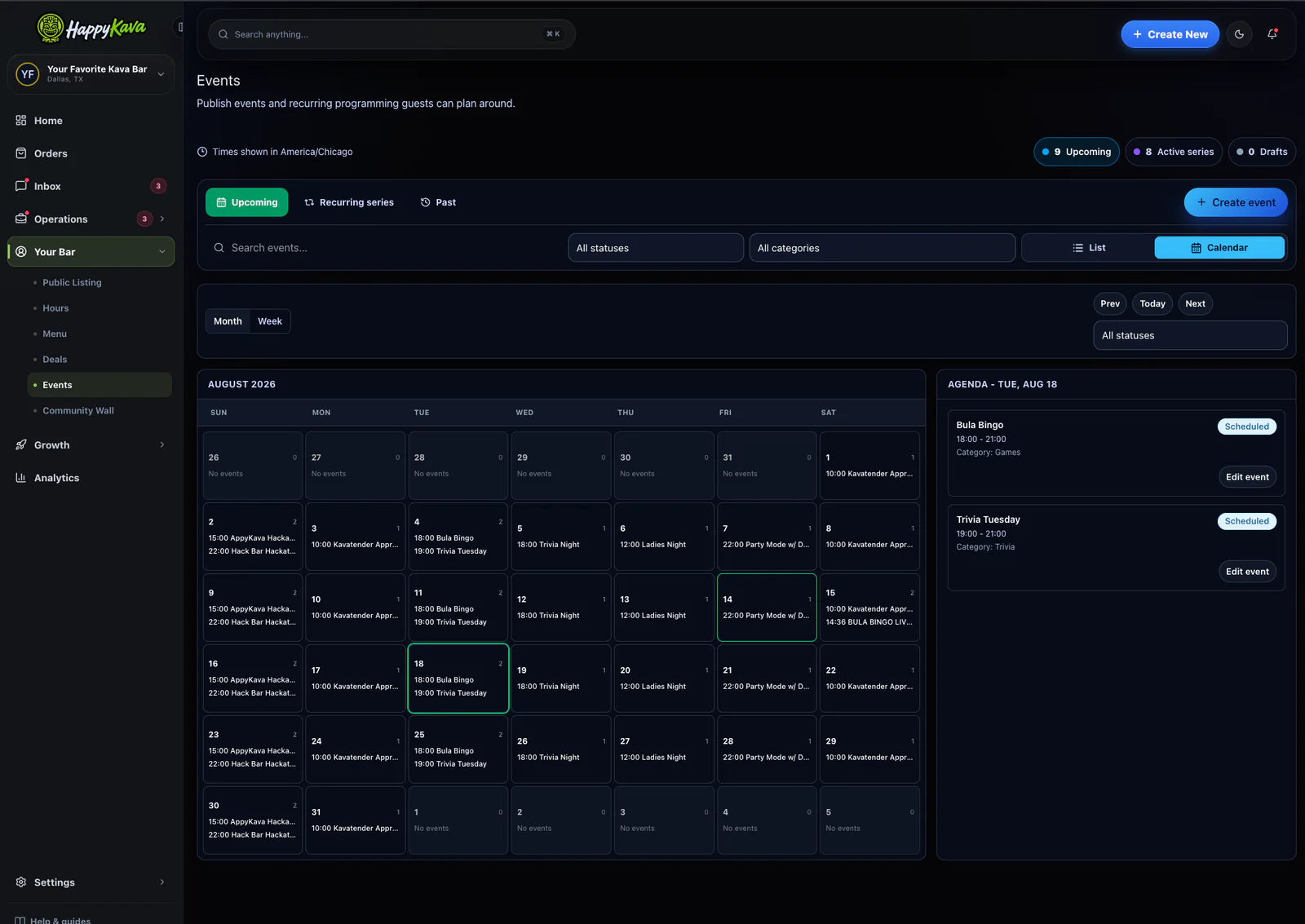
Publish one-time events and recurring series, switch between list and calendar views, and see the agenda for a selected day without juggling a separate event spreadsheet.
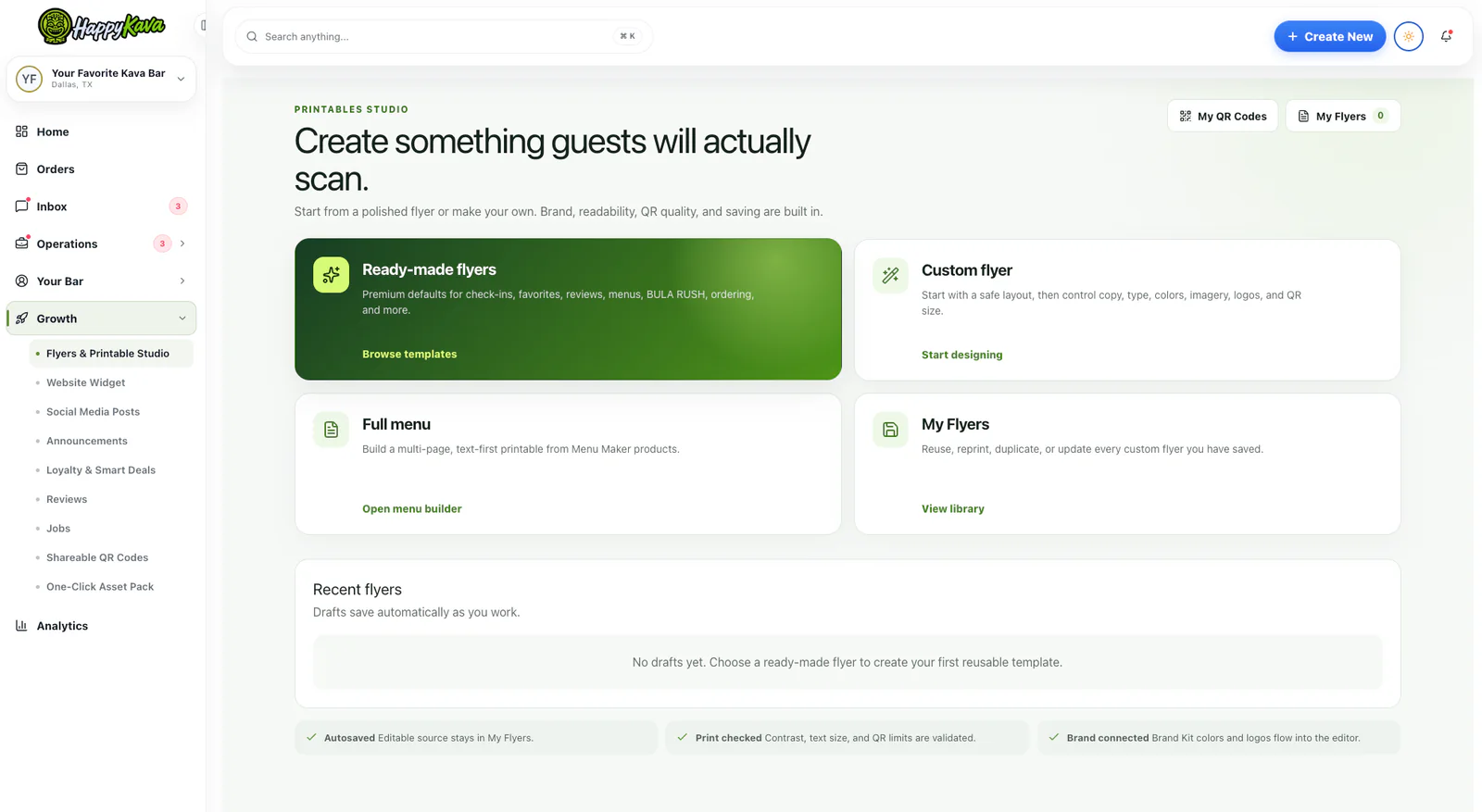
Start with a ready-made flyer, build a custom layout, produce a printable menu or reuse a saved design. Brand controls and QR tools help connect a physical sign or handout to the action you want a guest to take.
Start from where you are
Not claimed yet
Search first, then verify your role. This is the cleanest path when a listing exists but you do not yet control it.
Find my kava bar →Already managing
Check the details that influence a visit today: hours, menu availability, event programming, messages and customer-facing updates.
Open HappyKava →Growing the operation
Review current plan access, team roles, analytics and multi-location options against the work you need to manage.
See owner pricing →Control without pay-to-win
Owner access exists to make a business profile more accurate and useful—not to manufacture a reputation. Paying for tools does not let a business rewrite what the community says about it.
Identity, address, hours, contact links, photos, menus, events, offers and other authorized updates belong in the owner workflow.
Plans do not buy ratings, awards or leaderboard positions. Customers retain control of their honest reviews, subject to the same site policies.
A clean handoff from listing to dashboard
No new profile is needed when the correct bar is already listed. Start with the established location, prove your role and work from there.
Search by business name and city. Starting with the established listing keeps customers on one dependable page.
Sign in to HappyKava and complete the requested ownership or management checks for that location.
Confirm the address, hours, contact links, photos and menu before adding timely promotions or events.
Use the dashboard to catch what needs attention and publish accurate updates as the bar changes.
Before you claim or upgrade
For the latest plan-specific answer, use the information shown in your HappyKava account or review the current owner pricing.
Start by searching for your existing BestKavaBar profile. From that profile, continue to HappyKava and complete the role-verification steps for the location you are authorized to manage. This helps prevent duplicate listings.
The current portal includes tools for public listing details, hours, menus, deals, events and community updates. It can also include orders, inbox activity, analytics, QR codes and printable marketing tools. Your dashboard shows the tools available to your account.
No. HappyKava plans and owner tools do not buy a higher community rating, an award position or a leaderboard score. Customers keep control of their own reviews, and BestKavaBar applies the same published policies across listings.
HappyKava supports role-aware team access where it is available. The controls shown in your account determine which teammates can view or change information for a location.
Multi-location selection and management tools are available for eligible accounts. Open the location switcher in HappyKava or review the current plan details to see what applies to your business.
Pricing, eligibility and billing terms can change as the product develops. Review the current owner pricing page and the plan options shown inside HappyKava before making a decision.
Your bar is already doing the hard part
Start with the bar your customers already know. Claim the existing profile, then use HappyKava to keep the details, programming and guest touchpoints current.