
HappyKava app · 2026 field guide
HappyKava App: Find Kava Bars, Live Deals & Events
Find the bar, see what is happening, order pickup or delivery, pay through supported KavaPay flows, and keep Passport progress and value in one Wallet.
HappyKava now brings nearby bars, live deals, events, menus, pickup and delivery, KavaPay, Kava Cash, check-ins, Passport, Wallet, Home Bar activity, Crew tools, TravelRoot planning, and Bula Rush into one connected experience. This guide separates what each feature does, where availability varies, and what the team is building next.
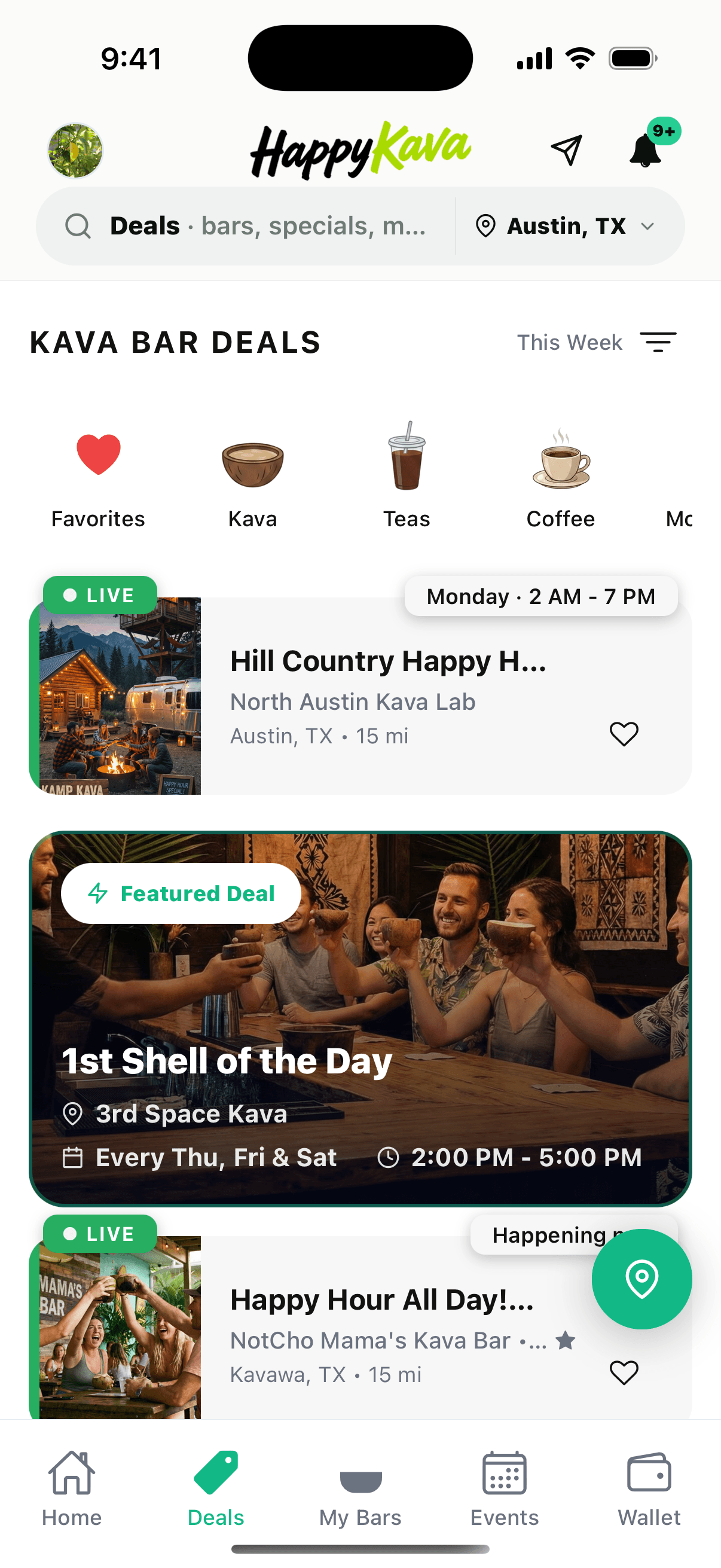
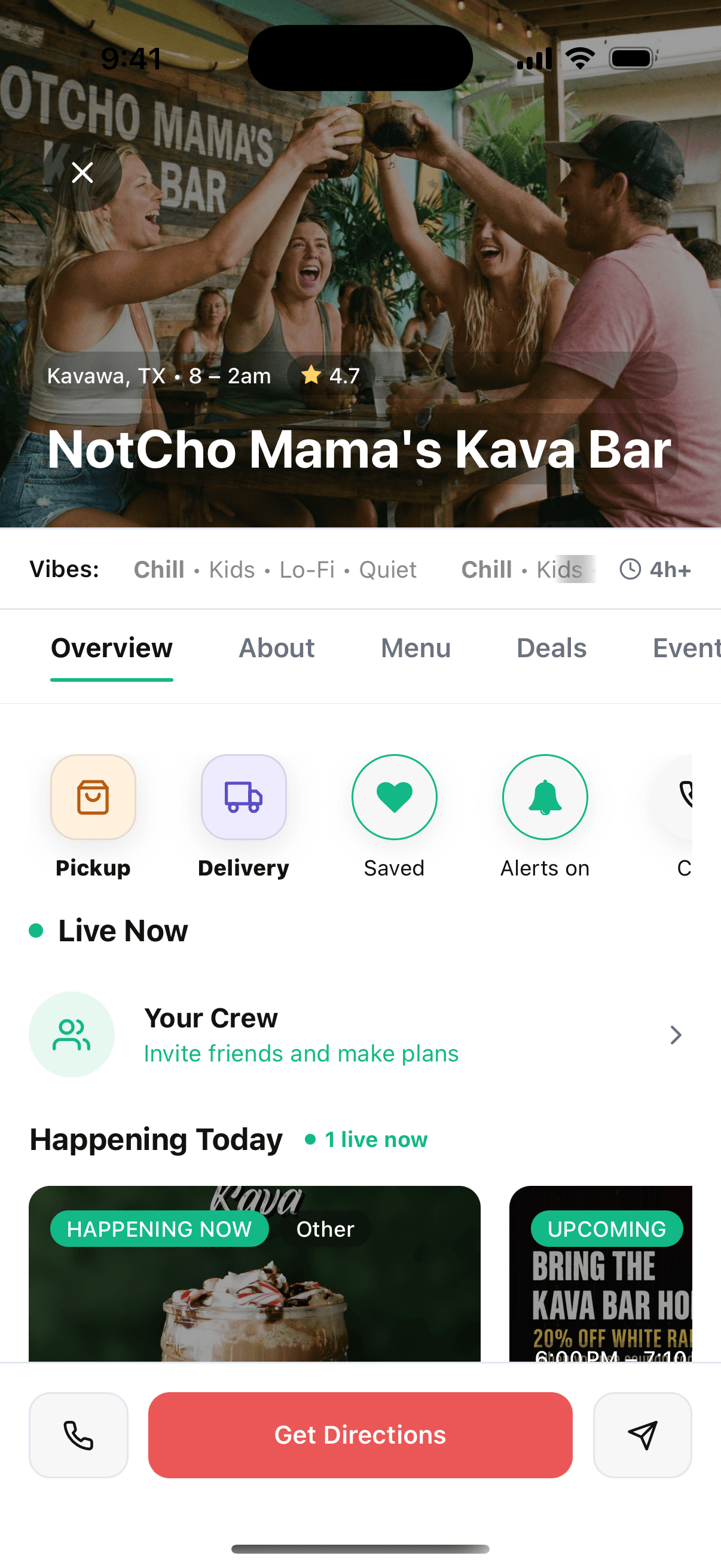
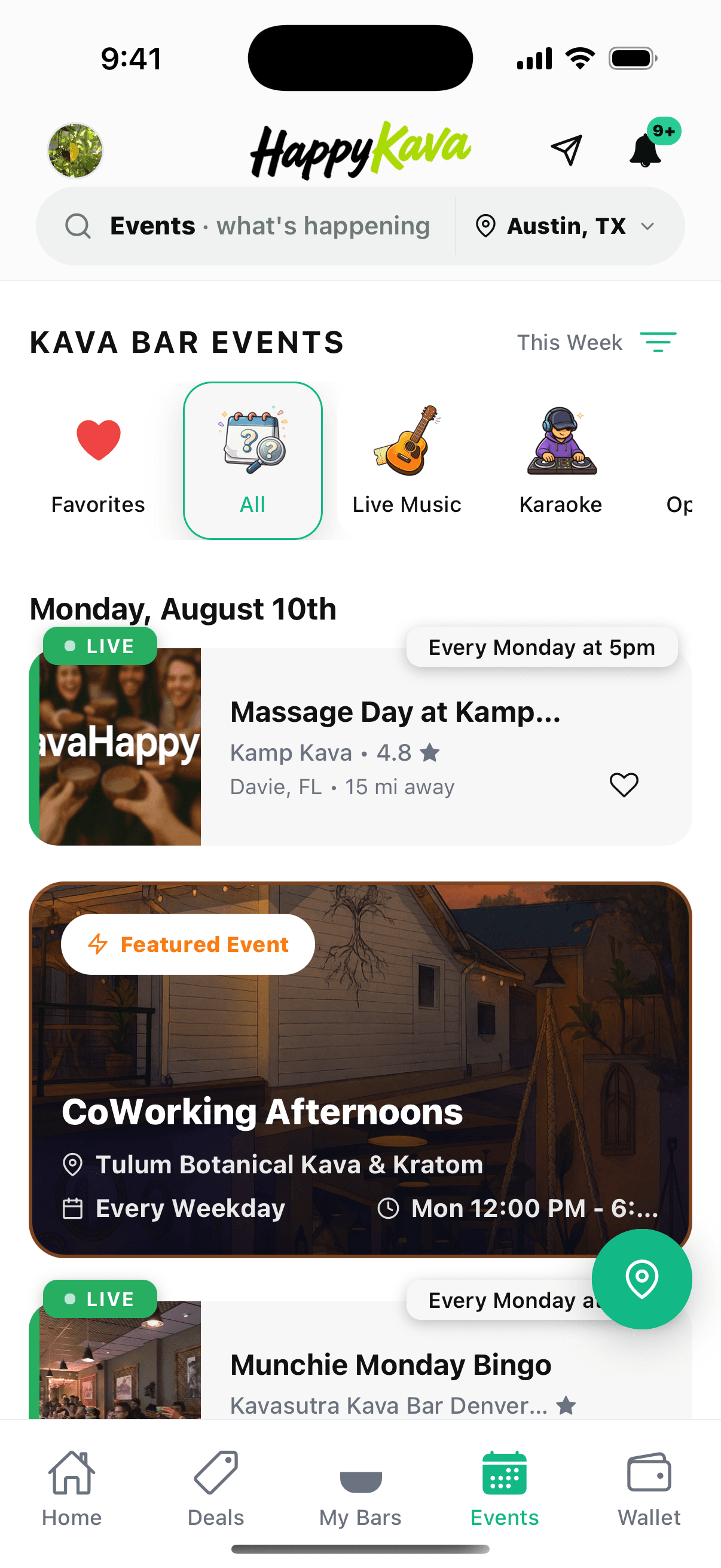
Authentic Simulator captures from the HappyKava 3.6 development build, August 10, 2026. Screen data and public feature availability can change.
Verified August 10, 2026
Current app-store snapshot
- Google Play
- Version 3.6.0
- Apple App Store
- Version 3.4
Google Play lists HappyKava 3.6.0, updated August 6, 2026. Apple’s public listing shows version 3.4, updated June 24, 2026. Features can vary by platform, app version, account, location permissions, participating bar, and staged rollout.
What HappyKava does now
Discovery is still the center. The orbit is much bigger.
The original app answered “where is a kava bar?” The current app helps answer “where should I go, what is live there, who is going, what can I do when I arrive, and what should the next stop be?”
Find the right bar
Search nearby or in another city, then use bar profiles, hours, vibes, menus, reviews, directions, and service options to choose your stop.
See what is live
Open dedicated Deals and Events views to find happy hours, featured offers, weekly happenings, and plans that are active now.
Order pickup or delivery
At participating bars, browse the current menu, customize a cart, choose fulfillment, verify delivery coverage, and follow the order after submission.
Use KavaPay
Where a bar and provider are supported, KavaPay can connect provider menus, in-house or pickup orders, receipt-based Quick Pay, hosted checkout, and Kava Cash.
Keep it in Wallet
Organize eligible passes, Passport, gift cards, Kava Cash balances and activity, plus Apple Wallet actions, in one dedicated place.
Explore with Passport
Track participating stops, visited progress, an itinerary, and eligible Passport Shells. The live app is the source of truth for participation.
Make it personal
Set a Home Bar, save favorites, check in, build your Crew, and follow the places and live activity that matter to you.
Plan with TravelRoot
Build kava-first routes for road trips, bar hops, and Crew outings instead of stitching together stops across multiple maps and social feeds.
Play Bula Rush
Join bar-centered arcade challenges and leaderboards, including multiplayer moments that connect play with real check-ins.
New to the category? Start with what kava is, then use HappyKava to find a nearby place to experience the culture in person.
Pick your path
Built for the first visit, the hundredth visit, and the bar itself.
Newcomer or traveler
Start with discovery
Use search, profiles, vibes, hours, live activity, and TravelRoot to find a place that fits the night you actually want.
Regular or Passport holder
Turn visits into a rhythm
Set your Home Bar, save favorites, check in, follow deals, connect with your Crew, order from supported bars, and keep Wallet and Passport close.
Owner or staff team
Make the bar discoverable
Keep the venue profile useful, publish deals and events, manage menus and service availability, and turn nearby discovery into trackable orders and visits.
Go out with a plan
Deals and events are live surfaces—not forgotten calendar pages.
HappyKava separates offers from events so each one is fast to scan. Drink filters make it easier to narrow deals. Event categories make it easier to find the kind of room you want. Live labels, featured cards, recurring schedules, distance, and save actions keep the useful details close to the decision.
- See offers and happenings that are active right now.
- Filter by drink or event type instead of searching social posts.
- Move from a listing to the full bar context before you leave.
The 3.6 generation
A much more complete app than the 2025 launch.
The public store builds are not on the same version today, but this is the direction of the current product: one connected experience from discovery to ordering, payment, arrival, participation, and the next visit.
A stronger Home experience
The current Home feed brings together a featured story, a personalized Home Bar, nearby activity, Crew entry points, featured strains, TravelRoot, Bula Rush, and Passport.
Home Bar and live context
Choose the place you return to most and see its current hours, service options, live deal or event context, Regulars progress, and quick actions.
My Kava Crew
Find friends already using HappyKava, scan or share Crew invites, plan meetups, and carry the social side of a kava bar beyond one visit.
Wallet and Passport access
Wallet organizes eligible Passport cards, passes, gift cards, Kava Cash, activity, and Apple Wallet actions instead of scattering them through unrelated screens.
Pickup and Delivery ordering
Participating bars can expose a menu-led cart for Pickup or Delivery, with mode-aware availability, address coverage, checkout, and post-submit order status.
KavaPay and Kava Cash
KavaPay is the bar-and-provider capability layer for connected ordering and Quick Pay; Kava Cash is an optional HappyKava balance and payment method within supported flows.
TravelRoot and Bula Rush
Kava-first trip planning and bar-centered arcade challenges give discovery a destination and regulars a new reason to participate.
Refreshed discovery surfaces
Deals, Events, search, and bar profiles use clearer filters, featured placements, current status, and richer visual hierarchy than the original launch app.
One profile, more context
The bar page is where discovery becomes a real visit.
A bar profile can now carry far more than an address. It can show the room’s vibe, current hours, live presence, today’s deals and events, menu and review tabs, Graffiti Wall activity, Passport participation, pickup or delivery options, and the direct actions that get someone through the door.
Ordering in HappyKava
From “this looks good” to an order the bar can act on.
Ordering appears only when a bar, menu, fulfillment mode, and operational rollout are ready. If Pickup or Delivery is unavailable, HappyKava keeps the rest of the bar profile useful instead of pretending every listing supports checkout.
- Ordering
- Build the cart, choose Pickup or Delivery, and follow fulfillment.
- KavaPay
- Connect supported bar and provider ordering or payment actions.
- Wallet
- Organize eligible balances, cards, passes, and activity.
- Passport
- Track the separate exploration program and participating stops.
One bar menu
Pickup and Delivery share the menu, not the assumptions.
Start in a participating bar’s Menu, add available products and options, then choose the fulfillment path. Compatible items stay in the cart when you switch modes, while HappyKava refreshes pricing and availability for the new path.
- Item availability and totals are rechecked before submission.
- Unavailable modes stay disabled or explain what needs attention.
- Submitted orders move into order detail, history, and active status.
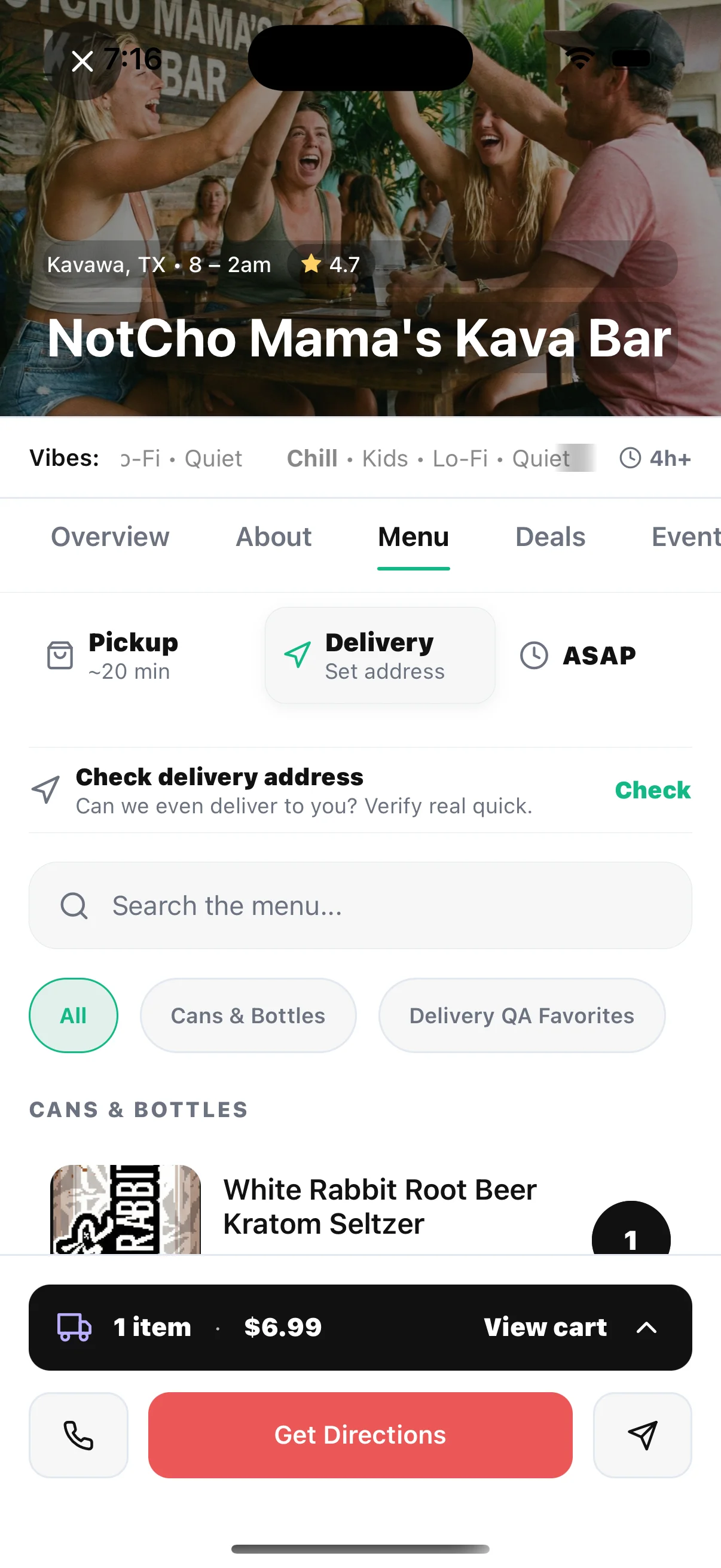
Pickup orders
Order ahead. Pay at pickup where Pickup Lite is enabled.
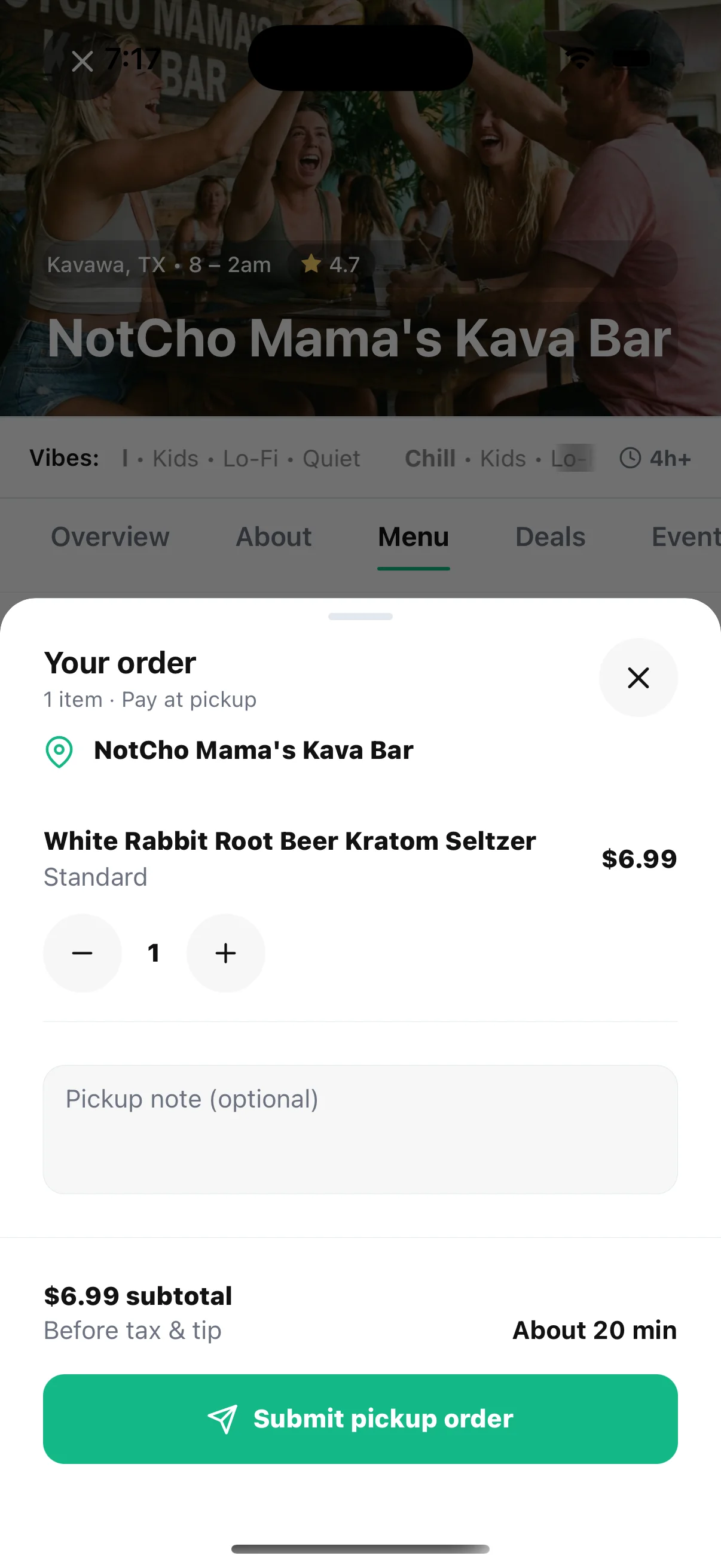
Review quantities, add a note, see the expected wait, and submit the order to the bar’s HappyKava queue. Staff can accept, prepare, mark it ready, complete it, or flag that it needs attention. Provider checkout and Kava Cash remain separate, bar-specific capabilities.
Delivery orders
Prove the destination works before asking for checkout.
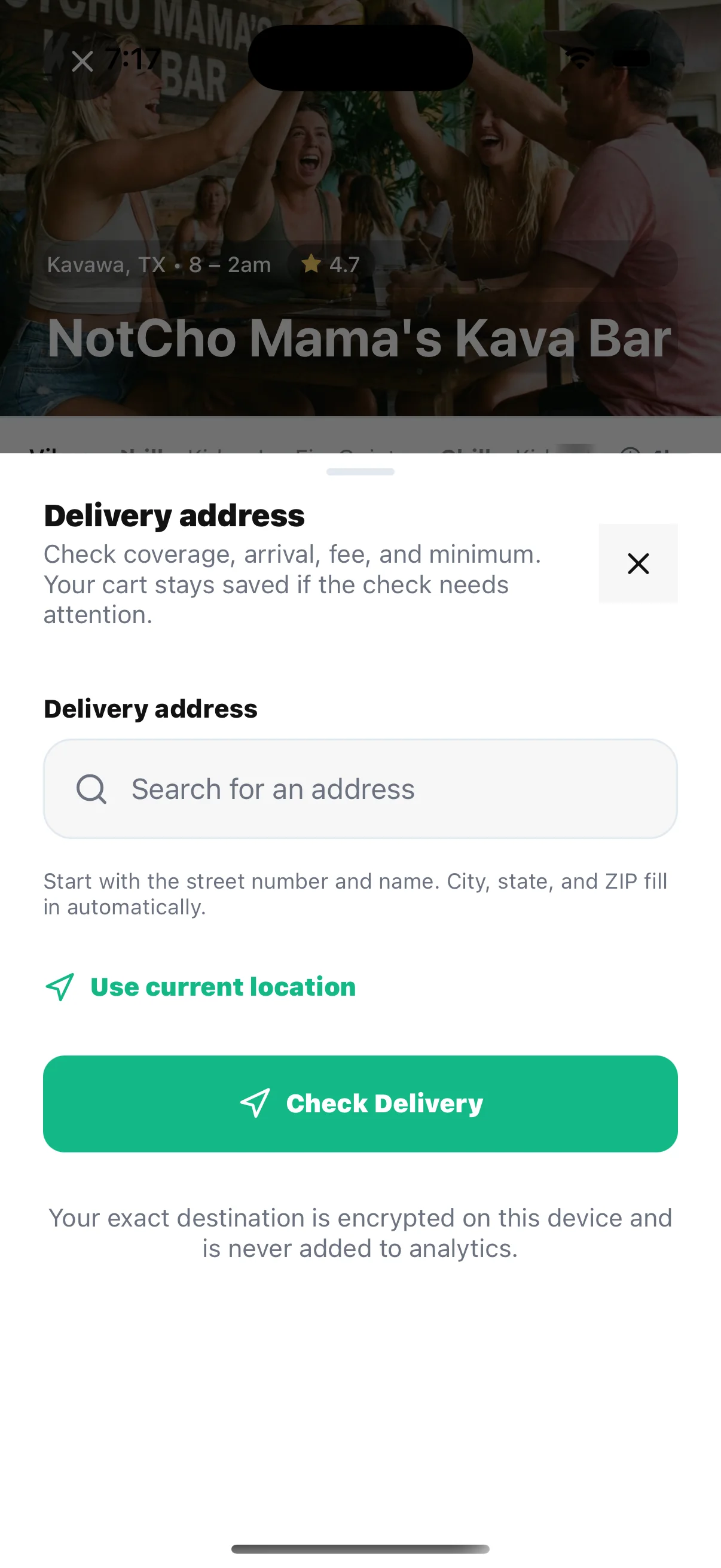
HappyKava checks the delivery address for coverage, arrival estimate, fee, and order minimum before checkout. Exact destination data stays out of analytics. Eligible flows can then collect recipient details, instructions, age confirmation, payment, and a final confirmed total.
- 01Choose an enabled bar
Pickup and Delivery surface only when that bar and mode are ready.
- 02Build the cart
Select current menu items, required options, quantities, and notes.
- 03Confirm fulfillment
Review pickup timing or validate the delivery destination and quote.
- 04Follow the order
Use active order status or My Orders; some advanced tracking is staged.
KavaPay, explained
It is the connection layer—not another name for Wallet.
KavaPay exposes only customer-safe actions that a participating bar’s certified provider connection can support. That can mean connected ordering, receipt-based Quick Pay, hosted checkout, or Kava Cash—not one universal checkout shown at every bar.
Connected ordering
Menu first, provider readiness checked again at submit.
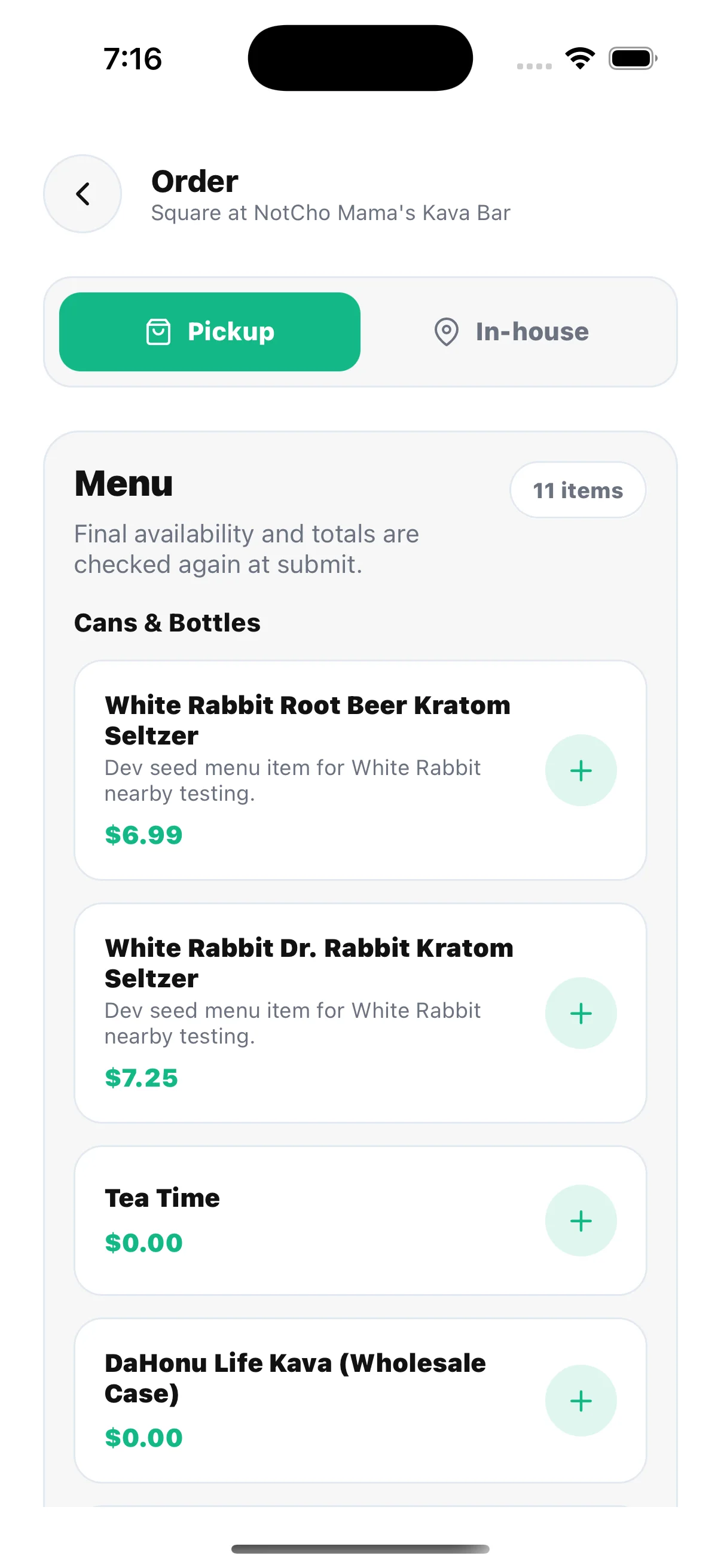
A supported KavaPay order can offer Pickup or In-house modes, read a customer-safe provider menu, and recheck the provider before the order is sent. Depending on the certified connection, payment may stay at the bar, open a hosted provider checkout, or use an eligible Kava Cash balance.
Quick Pay
Review the receipt total before a payment handoff begins.
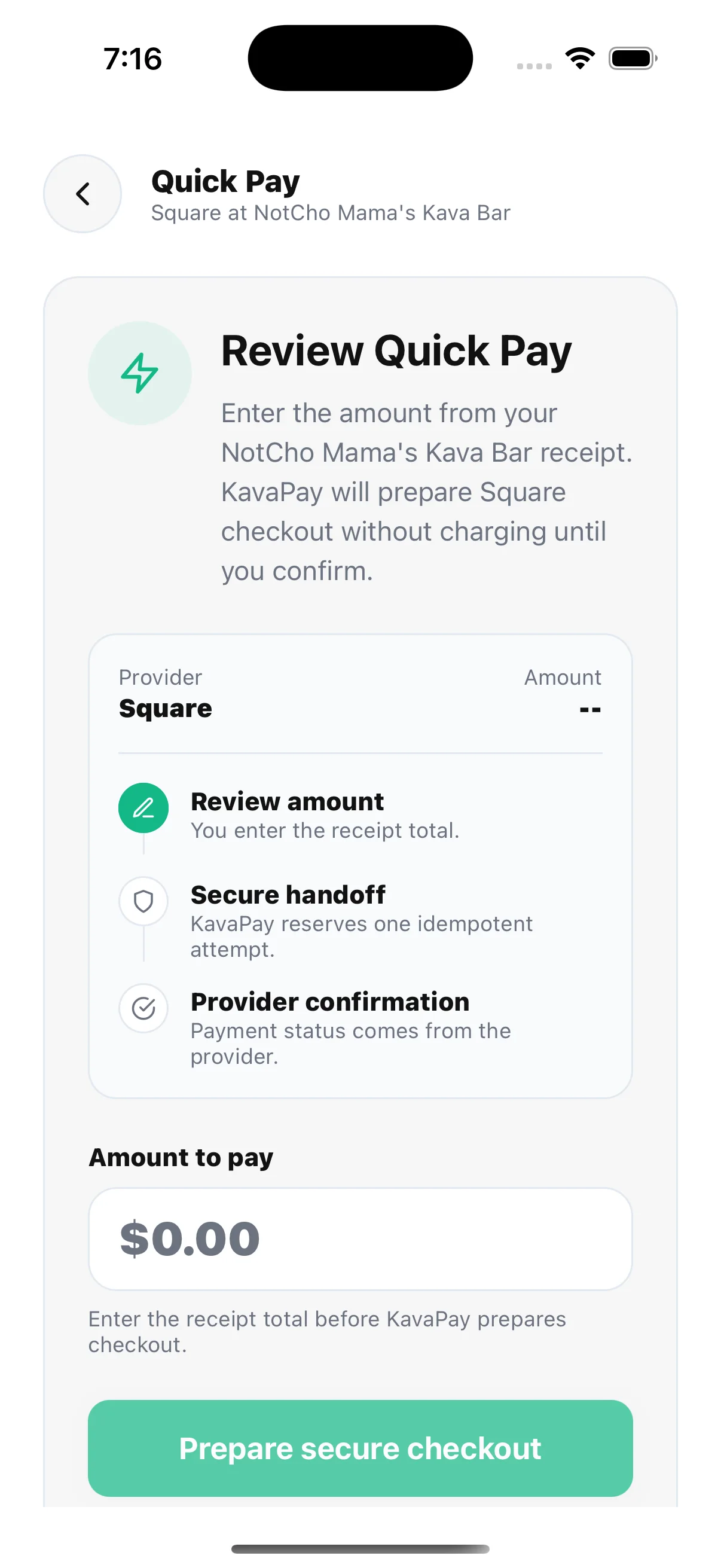
At a supported bar, Quick Pay lets you enter the amount from the receipt, review it, and prepare the connected provider checkout. Entering an amount does not charge you. You still confirm the checkout, and the provider remains the source of truth for final payment status.
Availability rule: if the bar or provider is not ready, HappyKava shows an unavailable state instead of starting a payment it cannot safely reconcile.
Wallet + HappyKava Passport
Stored together. Built for different jobs.
Wallet is the container for value and access. Passport is the exploration program inside it. Keeping those concepts separate makes balances, redemptions, and trip progress much easier to understand.
HappyKava Wallet
Passes, cards, balances, and activity in one place.
Wallet can organize eligible Passport cards, promotional passes, gift cards, Kava Cash balance and activity history, plus available Apple Wallet actions. The Overview, Passes, and Activity panes stay useful even when an individual item type is empty or unavailable.
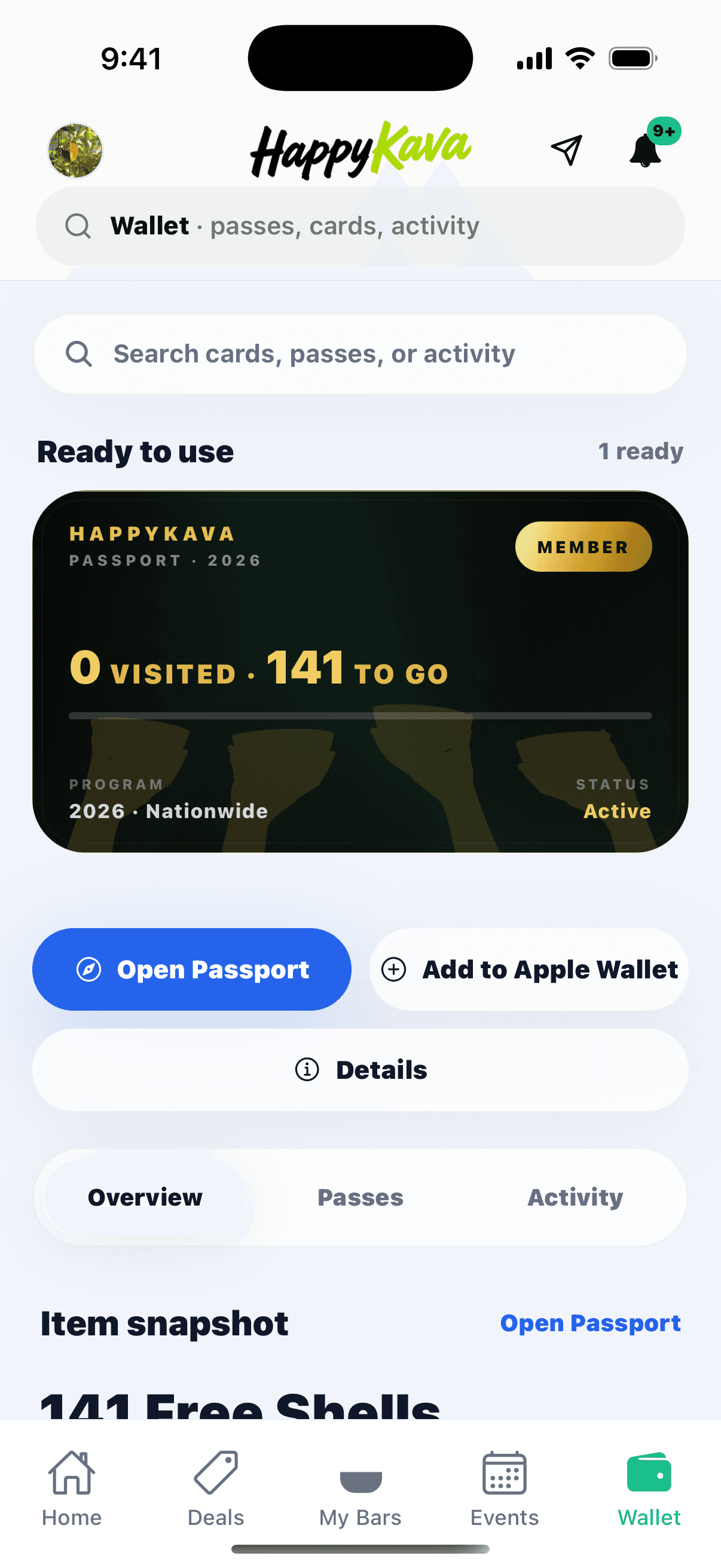
HappyKava Passport
Your member card, visited progress, nearby stops, and itinerary.
Passport turns participating-bar exploration into a visible journey. Open the program to see active status, progress, list or map discovery, nearby participating bars, and what is next. At an eligible stop, staff validates the Passport Shell under the current program rules.
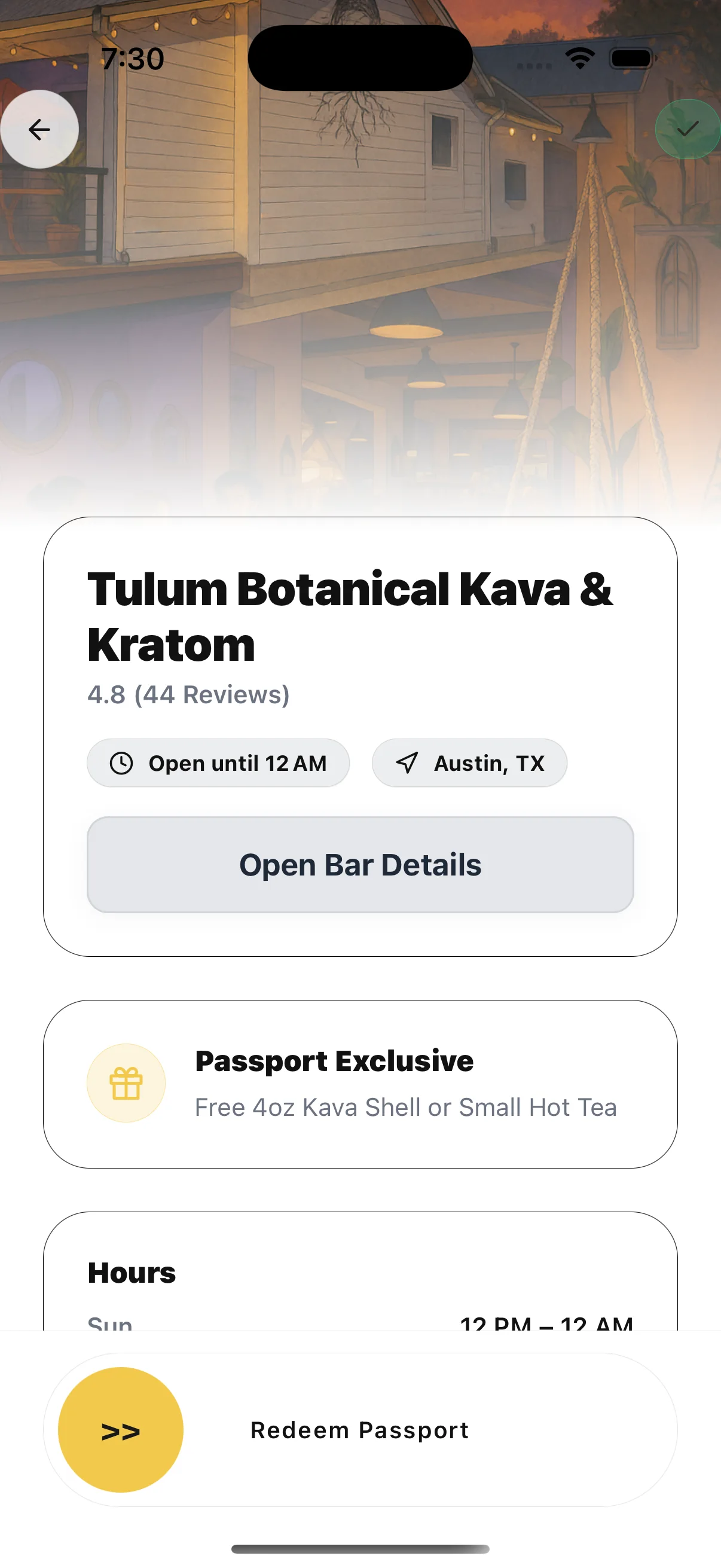
Participating bars, remaining stops, eligibility, payment methods, and Wallet item types can change. The signed-in app is the live source of truth.
Explore HappyKava on the webWhat comes next
Upcoming Features / Roadmap
HappyKava is continuing to grow with new ways to order, explore, and connect with kava bars.
- Bula WheelMore interactive deals and promotions from participating kava bars.
- Order trackingClearer pickup and delivery updates after an order is placed.
- Event RSVPsMore ways to plan around events at your favorite kava bars.
- City Passports and curated Kava KrawlsNew ways to explore local kava scenes and discover participating stops.
- More for regularsMore ways for participating bars to recognize and reward their regulars.
- Better tools for kava barsMore useful ways for owners to share updates and connect with their community.
The short origin story
From a discovery problem to a kava operating system
HappyKava launched publicly in October 2025 to solve a simple problem: finding a kava bar, a shell special, or something happening tonight required too many disconnected searches. The first release focused on discovery. The current product is broader—part city guide, part live activity feed, part ordering and payment layer, part loyalty wallet, part trip planner, and part community layer for the bars themselves.
Read the deeper HappyKava v3 visionFor owners and staff
If you run a kava bar, freshness is the feature
A useful discovery and ordering app depends on useful bar information. Owners and staff can turn a basic listing into a current destination by maintaining hours, menus, item availability, pickup and delivery settings, events, deals, and the details that make the venue distinct. Keep BestKavaBar and HappyKava information aligned so guests do not hit conflicting hours, stale menus, old promotions, or missing service context.
FAQ
HappyKava App questions, answered.
Versions and participation move quickly. These answers were reviewed on August 10, 2026.
Is the HappyKava app free?
HappyKava is free to download. Optional purchases, passes, paid programs, ordering, or bar-specific offers may have their own prices and terms.
Is HappyKava available on iPhone and Android?
Yes. HappyKava is listed in both Apple’s App Store and Google Play. The public versions and individual feature rollouts can differ between platforms.
What is the HappyKava Passport?
Passport is a participating-bar exploration program. The Passport screen shows membership status, visited progress, participating locations, map or list discovery, and itinerary stops. Eligible visits can add a validated Passport Shell, subject to the current program rules. Participation and eligibility change, so check the app before planning a redemption.
Can I place a pickup order in HappyKava?
At participating, ordering-ready bars, yes. Open the bar Menu, choose Pickup, add available items and options, review the estimated wait, add an optional note, and submit. Pickup Lite currently uses pay at pickup where enabled; supported payment methods and status tools can vary by bar and rollout.
How do HappyKava delivery orders work?
Choose Delivery from an eligible bar Menu, then verify an address before checkout. HappyKava checks coverage, estimated arrival, fee, and minimum; keeps the exact destination out of analytics; and carries the compatible cart into delivery checkout. Delivery, payment, cancellation, and live-tracking options depend on the bar and rollout.
What is KavaPay?
KavaPay is HappyKava’s bar-and-provider capability layer. At supported bars it can power connected menus and ordering, receipt-based Quick Pay, hosted provider checkout, provider-confirmed payment status, and optional Kava Cash payment. It is not available at every bar, and the exact actions depend on provider readiness and staged availability.
Does KavaPay charge me as soon as I enter an amount?
No. Quick Pay first asks you to review the receipt amount and prepares the supported provider checkout. The app states that payment does not start until you confirm, and the provider remains the source of truth for final payment status.
What is the difference between KavaPay, Kava Cash, Wallet, and Passport?
KavaPay connects supported ordering and payment actions to a bar’s provider. Kava Cash is an optional HappyKava balance that may be used in enabled orders. Wallet organizes eligible balances, activity, passes, gift cards, and Passport cards. Passport is the exploration membership and progress program stored in that Wallet.
Do I need an account or location access?
Some browsing may be available without every permission, but personalized recommendations, saved activity, check-ins, Crew tools, Passport status, ordering, and accurate nearby results can require sign-in or location access.
How can a kava bar owner update or manage a listing?
Open the HappyKava owner dashboard to manage the app presence, and claim the matching BestKavaBar listing to keep discovery information consistent across both surfaces.
Are upcoming features guaranteed?
No. Items described as in development or on the roadmap can change, move, or be released in stages. The app stores and in-app experience remain the source of truth for what is publicly available.